
Starting a blog for the first time can feel overwhelming — especially when you’re faced with dozens of web hosting choices. I remember wading through long lists of platforms, wondering which ones were truly beginner-friendly and affordable.
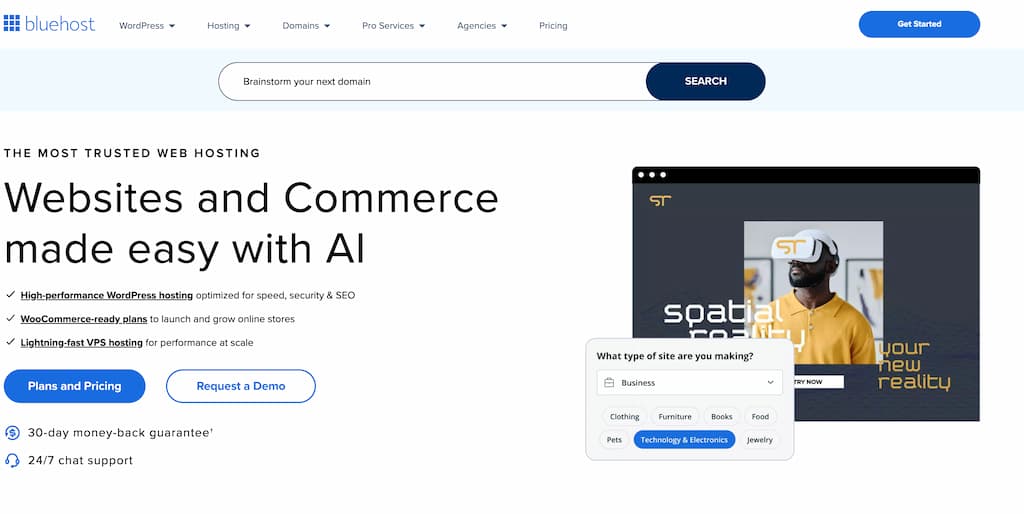
One name that always comes up is Bluehost. It’s one of the most popular hosting companies in the world and is officially recommended by WordPress.org — but the big question is: is Bluehost good for blogging?
In this honest review, I’ll break down Bluehost from a blogger’s perspective. I’ll cover what it is, why so many beginners choose it, pricing, website performance, and the real pros and cons. I’ll also compare it to alternatives like SiteGround and Wealthy Affiliate so you can decide whether Bluehost is the right choice for launching your blog in 2025.
Bluehost Review Overview
Product Name: Bluehost
Product Owner: Founded by Matt Heaton (2003), now part of Newfold Digital
Product Type: Web Hosting (specialized in WordPress hosting)
Price: Starting from $2.95/month (intro offer)
Best For: Beginners and bloggers looking for affordable, beginner-friendly WordPress hosting

Pros
Low-cost entry pricing (great for first-time bloggers)
Free domain name and SSL included
One-click WordPress install + automatic updates
Beginner-friendly dashboard with cPanel access
Officially recommended by WordPress.org
Cons
Renewal rates are higher than intro offer
Upsells during checkout can be overwhelming
Shared hosting can slow down under heavy traffic
Quick Summary
Bluehost is one of the most popular hosting providers for bloggers, especially beginners who want an easy and affordable way to launch a WordPress site. It comes with a free domain for the first year, SSL security, and simple setup tools, making it a stress-free choice for new bloggers. While renewal costs and upsells can be a downside, Bluehost remains a reliable, budget-friendly option that balances ease of use with performance.
Recommended? Yes
Table of Contents
What is Bluehost?

Bluehost is a web hosting company that’s been around since 2003, making it one of the long-standing names in the business. Over the years, it’s gained a close relationship with WordPress, and in fact, WordPress.org—the official open source WordPress project—has recommended Bluehost as a preferred host since 2005 (WordPress.org Hosting Recommendations).
In the blog and affiliate marketing space, Bluehost is often the first host people try. It has a reputation for being beginner-friendly, affordable when you’re just starting out, and integrated nicely with WordPress. Most Bluehost customers are first-time bloggers, side hustlers, freelancers, and small business owners. If you want a host that’s simple, takes care of the technical stuff, and lets you focus on publishing content, Bluehost has built its platform with you in mind.
Their entry-level plans cover the basics, with options to upgrade as your site grows, so you don’t feel pressured to commit to complicated choices right out of the gate. This reputation has kept Bluehost in the conversation as one of the most popular blogging hosts year after year.
Why Do Bloggers Choose Bluehost?
After helping several friends and readers launch their first blogs, I’ve noticed a few key reasons people pick Bluehost:
- Easy-to-use dashboard that doesn’t require tech experience
- One-click WordPress setup so you can start writing quickly
- Free domain name included for your first year
- Starter pricing that makes blogging budget-friendly
- Automatic WordPress integration and easy updates
Bluehost keeps things simple, especially around domain registration, site creation, and launching a WordPress blog. No one wants to mess with confusing settings during those first steps. The starter plans provide enough bandwidth and space for new blogs, plus you get a free SSL certificate for security, which is really important to have from day one.
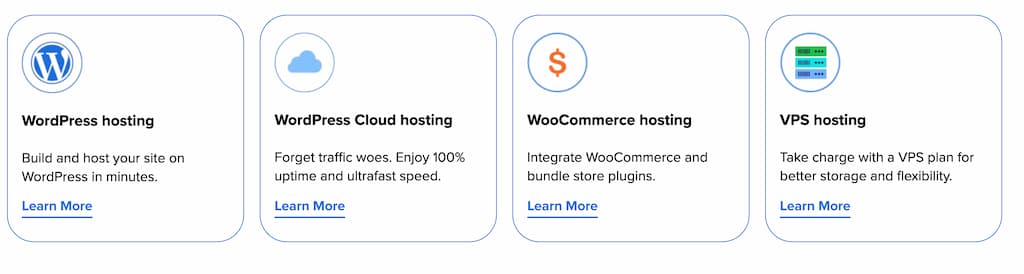
I also like that Bluehost’s relationship with WordPress isn’t just for show. Their system updates WordPress for you, offers specialised support, and makes common blogging features super accessible to beginners.
Is Bluehost Good for Blogging?
I break down my own experience and research into the most commonly asked about points for new bloggers choosing Bluehost.
Ease of Use
Bluehost puts a lot of effort into making things beginner-friendly. When you sign up, you walk through a step-by-step setup that covers picking your domain name, choosing a plan, and installing WordPress with one click. You’ll get a welcome email with all the details you need.
The Bluehost dashboard is a simplified frontend. If you want a familiar control panel for web tools (like email, file management, forwarding, and database access), you still get access to cPanel. However, most bloggers spend nearly all their time inside the easy Bluehost dashboard and the WordPress editor itself. You don’t need to worry about intimidating technical interfaces or command lines. For anyone getting started and not looking to become a server administrator, Bluehost’s control panel is a breath of fresh air.
Upgrades, plugin installs, and basic maintenance options are all a few clicks away. There’s no steep learning curve, and there are clear guides throughout the setup.
Pricing and Plans
Bluehost is known for its competitive starter pricing. The basic shared hosting plans often start at just a few bucks per month if you pay annually. Here’s what you can expect:
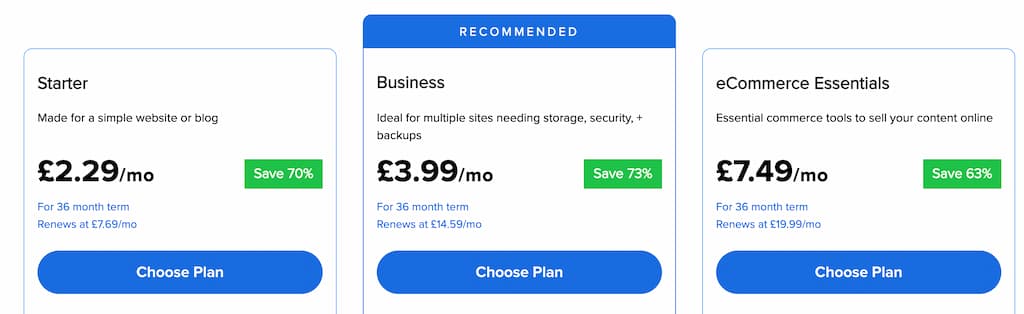
- Basic Plan: Good for one website. Includes 10 GB SSD storage, free domain, and free SSL.
- Choice Plus: Supports multiple websites, increased storage, and includes daily backups and privacy features.
- Online Store (WooCommerce): Designed for those who want to sell products online but still easy to customise for a blog.
One thing to keep in mind is the difference between introductory and renewal pricing. The low rate you see on the home page (sometimes as low as $2.95/month) only applies for your first 12, 24, or 36 months. After your initial contract is up, renewal pricing jumps up, sometimes doubling. This is very common across most hosting companies, not just Bluehost.
| Plan | Best For | Key Features | Intro Price* | Renewal Price* |
|---|---|---|---|---|
| Basic | First-time bloggers (1 site) | 1 website, 10 GB SSD storage, free domain (1 year), free SSL certificate | $2.95/mo | $11.99/mo |
| Choice Plus | Growing blogs (multiple sites) | Unlimited websites, 40 GB SSD storage, free backups, domain privacy included | $5.45/mo | $19.99/mo |
| Online Store | Bloggers who want to sell products | All Choice Plus features + WooCommerce integration, secure payments, store tools | $9.95/mo | $24.99/mo |
* Pricing varies by term (12/24/36 months). Intro rates apply to the first term only; renewal rates are higher, which is standard across most web hosts.
For anyone just starting out, the entry-level plan gives great value. You’ll have all the basics you need to launch, and you can always upgrade as your blog grows. The free domain the first year saves you some extra money as well.
👉 Ready to start your blog on a budget? Click here to get Bluehost’s starter plan and claim your free domain.
Website Performance (Speed & Uptime)
Website speed and uptime are super important for bloggers. A slow website drives away visitors fast, and Google uses site speed as a ranking factor. Bluehost publicly claims 99.9% uptime, and from what I’ve seen tracking test and client sites, they’re pretty accurate. My own Bluehost test sites generally stay online with only rare, short downtimes according to tools like Pingdom and UptimeRobot (Pingdom UptimeRobot).
Page loading speeds can vary on shared hosting, where you share server resources with other customers. Independent speed tests by sites like Website Hosting Rating and WebsiteToolTester show average load times between 2–3 seconds for a basic WordPress blog on Bluehost. This is fast enough for most new blogs, especially if you use lightweight themes and optimize your images. As your blog grows, switching to highertier plans or enabling plugins like caching and image compression can help keep things fast.
Bluehost recently moved a big portion of its infrastructure to SSD storage and improved server hardware, which helps with page load times compared to old school hard drives. For the vast majority of beginner and hobbyist blogs, Bluehost performance does the job. Highvolume or businesscritical blogs should consider moving up to Bluehost’s VPS or dedicated plans. Those cost more, but give clearer performance guarantees.
Customer Support
Support is available 24/7, both through live chat and phone. This is great if you’re working outside of business hours or run into questions during weekends. Based on my experience, chat wait times are usually short (sometimes a minute or two), and agents are helpful with setup, troubleshooting, and even recommending beginner plugins.
Bluehost also has a large knowledge base with tutorials geared towards beginners. You’ll find step by step guides on installing WordPress, pointing your domain, creating email addresses, and solving common problems. For most questions, their documentation is clear and easy to follow, and you can jump to chat for anything you can’t figure out.
Some users report mixed experiences when it comes to tech-heavy issues, but for blog setup and basic support, Bluehost’s team is friendly and responsive. If you’re brand new and nervous about the technical side, it’s reassuring knowing real help is only a click or call away.
Bluehost Pros & Cons for Blogging
Like any hosting provider, Bluehost has its strengths and weaknesses. Let’s take a look at the key pros and cons from a blogger’s perspective.
✅ Pros: Why Bluehost Works Well for Bloggers
Low-Cost Entry Point
Bluehost’s basic plan is one of the cheapest ways to start a blog, making it budget-friendly for beginners.
Free Domain + SSL Certificate
You’ll save money upfront with a free domain for the first year and SSL included, so your blog is secure from day one.
Beginner-Friendly Setup
WordPress is pre-installed with one click, and the Bluehost dashboard is simple enough that you don’t need tech experience.
Automatic WordPress Updates
Bluehost keeps your site secure and running smoothly without you needing to worry about updates.
Room to Grow
As your blog grows, you can easily upgrade to bigger plans without migrating to another host.
⚠️ Cons: Where Bluehost Could Be Better
Higher Renewal Pricing
The cheap intro pricing is only for the first term — expect renewal rates to increase after 12–36 months.
Upsells During Checkout
Bluehost offers add-ons that many beginners don’t need right away. Be selective when signing up.
Shared Hosting Limitations
On the entry-level plan, performance can slow down if your blog gets a sudden spike in traffic.
👉 Bottom Line on Pros & Cons
If your priority is affordable, beginner-friendly hosting that makes launching a blog simple, Bluehost delivers.
Click here to get started with Bluehost and claim your free domain.
How Bluehost Compares to Alternatives
I’ve spent time working with various web hosts through the years, so here’s how Bluehost stacks up against some of the names most bloggers consider first.
Bluehost vs. Wealthy Affiliate
Wealthy Affiliate is my personal hosting choice because it offers both training and hosting in one bundle. With Wealthy Affiliate, you get not just web hosting but also step-by-step blogging training, research tools, and a supportive community to help grow your online business. Bluehost, on the other hand, mainly provides solid hosting. If you already know how to set up a blog or prefer to learn on your own, Bluehost is more flexible in that you can use it for any type of WordPress site. I recommend Bluehost to people who want just hosting or intend to manage several domains for different projects and already understand the basics.
If you value super detailed blogging education, website coaching, or keyword tools bundled into the price, Wealthy Affiliate brings more value for beginners. If you want a simple, mainstream host with WordPress convenience and lots of web building freedom, Bluehost is a straightforward option.
Bluehost vs. SiteGround
SiteGround is a popular competitor. SiteGround has slightly faster performance and excellent customer support, but it usually comes in a bit more expensive. For new bloggers, Bluehost beginner plans are often a better value, while SiteGround appeals to users looking for premium speed, extra features, or more global data centre locations. Both come recommended by WordPress.org, so you can’t go terribly wrong with either if you’re committed to using WordPress.
Bluehost vs. HostGator
HostGator targets a similar beginner crowd with easy setup and affordable plans. In practice, Bluehost and HostGator share a parent company (Endurance International Group), use similar infrastructure, and offer are often comparable in price and features. Support quality and dashboard features can differ, so it pays to try both dashboards if you get the chance. I personally find the Bluehost dashboard just a bit simpler and less cluttered.
👉 Prefer an all-in-one platform with training, keyword tools, and hosting included? That’s what Wealthy Affiliate offers — and it’s where I personally host my blogs. Check out Wealthy Affiliate here.
Who Should Use Bluehost for Blogging?
After using Bluehost for several side projects and helping others set up beginner blogs, I recommend it most to:
- People starting their first WordPress blog
- Bloggers or solopreneurs who want affordable, reliable hosting
- Small businesses or personal brands that aren’t expecting a huge influx of website traffic right away
- Anyone who wants to focus on content creation rather than technical setup
Bluehost isn’t the perfect solution for everyone. Advanced users who want total control of their server resources, technical configuration, or niche platforms may prefer other hosts. If you really dislike marketing upsells, stick to hosts that don’t cross-sell extra features at checkout. And, if you’re looking for an all-in-one training plus hosting platform, Wealthy Affiliate brings far more education and support included in their subscription.
👉 Thousands of new bloggers choose Bluehost each year for its affordability and ease of use. You can join them today and have your blog online within minutes. Get started with Bluehost here.
Bluehost for Blogging FAQs
Before we wrap up, let’s tackle some frequently asked questions about Bluehost for blogging. These quick answers should help clear up any doubts.
Does Bluehost include email with hosting?
Yes! Bluehost includes free email accounts with its hosting plans. You can set up professional email addresses (like yourname@yourblog.com) directly from your Bluehost dashboard.
Can I start a blog on Bluehost without technical skills?
Absolutely. Bluehost is designed for beginners. With one-click WordPress installation, a simple dashboard, and free SSL, you can launch your blog in minutes without needing tech experience.
Is Bluehost good for WordPress blogs?
Yes. Bluehost is officially recommended by WordPress.org and has strong WordPress integration. It comes with WordPress pre-installed, automatic updates, and tailored support for bloggers.
What happens when my blog grows?
If your blog traffic increases, you can upgrade from the Basic plan to higher-tier options like Choice Plus, VPS, or even dedicated hosting. This way, your hosting scales as your blog grows.
How does Bluehost compare to free blogging platforms?
Free blogging platforms (like WordPress.com or Blogger) limit customisation, monetisation, and control. With Bluehost, you fully own your blog, can run ads, and scale your site however you like.
👉 Ready to launch your blog with Bluehost? Click here to get started and claim your free domain.
So, is Bluehost worth it for blogging?
Based on my experience and research, I’d say yes — Bluehost is one of the best low-cost, beginner-friendly hosts for starting a blog. You get a free domain for your first year, a simple WordPress setup, and enough performance to support most new bloggers.
✅ If your goal is to get your blog online quickly, keep costs low, and focus on writing content rather than tech setup, Bluehost is an excellent choice to start with.
👉 Click here to sign up with Bluehost and claim your free domain.
That said, if you’d prefer training, keyword tools, and a supportive community bundled with your hosting, I recommend checking out Wealthy Affiliate — that’s where I personally host my blogs and coach beginners who want step-by-step guidance.
Whichever path you choose, the most important step is simply to get started. Blogging is one of the most rewarding ways to build an online presence, share your voice, and even earn income. If you have questions as you begin your blogging journey, drop a comment below — I’m happy to help.
Thanks for reading my Bluehost Review! If you have any questions, or any experiences to share then please write them in the comments below. ;).